














• Product
  • Workbench

Workbench

Automated Workflow Builder

  • Workbench - Trum·pia

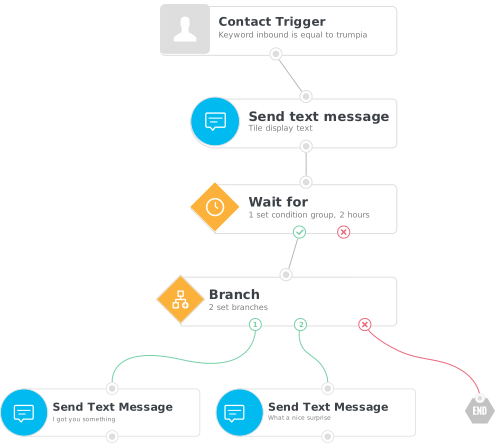
    Trum·pia’s Workbench is an automated workflow builder that allows you to customize your text messaging and email campaigns through an easy-to-use UI with drag-and-drop functionality. Workbench requires no coding and comes with dozens of pre-built templates so you can kickstart your messaging campaigns quickly.

    Build powerful and tailored engagement with your customers, members, and employees without needing to know how to code. Create powerful new workflows in minutes instead of months, and modify them on the fly whenever you need to.

    Why Use Workbench?

    Unsurpassed Customizability

    Trum·pia Workbench gives you the freedom to create complex workflows with step-by-step instructions so you never get lost. Other workflow tools are difficult to use and don't give you enough control over customizing your workflows.

    Free Up Time

    You can use Workbench to carry out tasks such as sending out timely offers, triggered reminders, and targeted alerts. This frees your staff up to work on more important tasks, and gives your customers faster and more relevant service.

    Automate Chores

    Common messaging chores can lead to wasted productivity and manual errors. Our Workflows allow you to automate chores, cut down on mistakes, and help you provide top quality service 24/7.

    Build One-of-a-Kind Processes Just for You

    Your business logic should determine how your workflows work, not the other way around. A messaging system that fully understands your business workflow can turbocharge your business instead of having to tell customers "that is just how our system works."

    What are Workflows?

    Workflows are automated campaigns that carry out complex actions for your business. They lead customers or employees through a personalized journey in order to deliver them the information or experience they want. Currently, your business might have elaborate processes that require employees to carry out manual tasks like sending follow-up surveys, onboarding new hires, or responding to frequently asked questions. Trum·pia Workbench can completely automate these existing processes, so you can eliminate repetitive work for your employees and enable them to be more productive.

    How It Works

    Our workflow is easy to use because it has a drag and drop interface that help you build complex workflow in minutes. There is no coding required, so you can save time and money from having to hire a programming team. Here are the components (called objects) you’ll use to put together to create your workflow.
    • Actions are objects in a workflow that carry out tasks when they are triggered or when a condition is met.
      This ranges from sending a text message or email to a new customer to starting a conversation with your employee. It also can do things like score a lead, answer questions, put a contact in a list, update a data field, or any of dozens of other actions that may be required to complete the workflow.

    • Actions

      Actions are objects in a workflow that carry out tasks when they are triggered or when a condition is met.
      This ranges from sending a text message or email to a new customer to starting a conversation with your employee. It also can do things like score a lead, answer questions, put a contact in a list, update a data field, or any of dozens of other actions that may be required to complete the workflow.

      Workbench's workflow actions illustration
    • Conditions

      Conditions are objects that check on a value.
      Whether it's a contact's status in your system or just how they've responded to your prompts, they let you react to your contact and respond accordingly in order to make sure they get the best possible interactions.

      Illustration for Workbench's workflow conditions
    • Pauses

      Pauses are objects that wait for certain things to happen.
      Sometimes your workflow simply has to wait for the subscriber to take action or wait a specified time before sending another message. Pauses can also lead to the end of a workflow, discontinuing when the overall goal is met.
      Icon shows how a workflow can pause until the subscriber takes action or waits a specified time before sending another message
    • Triggers are objects in a workflow that kickstart the action.
      They begin the interaction based on your contact taking action or their information getting updated, like when they are put on a new list. Some examples of triggers are when a contact texts in a keyword, responds to a prompt, clicks a link, or earns a certain score in contact scoring.

    • Actions

      Actions are objects in a workflow that carry out tasks when they are triggered or when a condition is met.
      This ranges from sending a text message or email to a new customer to starting a conversation with your employee. It also can do things like score a lead, answer questions, put a contact in a list, update a data field, or any of dozens of other actions that may be required to complete the workflow.

      Workbench's workflow actions illustration
    • Conditions

      Conditions are objects that check on a value.
      Whether it's a contact's status in your system or just how they've responded to your prompts, they let you react to your contact and respond accordingly in order to make sure they get the best possible interactions.

      Illustration for Workbench's workflow conditions
    • Pauses

      Pauses are objects that wait for certain things to happen.
      Sometimes your workflow simply has to wait for the subscriber to take action or wait a specified time before sending another message. Pauses can also lead to the end of a workflow, discontinuing when the overall goal is met.

      Icon shows how a workflow can pause until the subscriber takes action or waits a specified time before sending another message
    • Conditions are objects that check on a value.
      Whether it's a contact's status in your system or just how they've responded to your prompts, they let you react to your contact and respond accordingly in order to make sure they get the best possible interactions.

    • Actions

      Actions are objects in a workflow that carry out tasks when they are triggered or when a condition is met.
      This ranges from sending a text message or email to a new customer to starting a conversation with your employee. It also can do things like score a lead, answer questions, put a contact in a list, update a data field, or any of dozens of other actions that may be required to complete the workflow.

      Workbench's workflow actions illustration
    • Conditions

      Conditions are objects that check on a value.
      Whether it's a contact's status in your system or just how they've responded to your prompts, they let you react to your contact and respond accordingly in order to make sure they get the best possible interactions.

      Illustration for Workbench's workflow conditions
    • Pauses

      Pauses are objects that wait for certain things to happen.
      Sometimes your workflow simply has to wait for the subscriber to take action or wait a specified time before sending another message. Pauses can also lead to the end of a workflow, discontinuing when the overall goal is met.

      Icon shows how a workflow can pause until the subscriber takes action or waits a specified time before sending another message
    • Pauses are objects that wait for certain things to happen.
      Sometimes your workflow simply has to wait for the subscriber to take action or wait a specified time before sending another message. Pauses can also lead to the end of a workflow, discontinuing when the overall goal is met.

    • Actions

      Actions are objects in a workflow that carry out tasks when they are triggered or when a condition is met.
      This ranges from sending a text message or email to a new customer to starting a conversation with your employee. It also can do things like score a lead, answer questions, put a contact in a list, update a data field, or any of dozens of other actions that may be required to complete the workflow.

      Workbench's workflow actions illustration
    • Conditions

      Conditions are objects that check on a value.
      Whether it's a contact's status in your system or just how they've responded to your prompts, they let you react to your contact and respond accordingly in order to make sure they get the best possible interactions.

      Illustration for Workbench's workflow conditions
    • Pauses

      Pauses are objects that wait for certain things to happen.
      Sometimes your workflow simply has to wait for the subscriber to take action or wait a specified time before sending another message. Pauses can also lead to the end of a workflow, discontinuing when the overall goal is met.

      Icon shows how a workflow can pause until the subscriber takes action or waits a specified time before sending another message

    Example Workflows

    Lead Nurturing

    Our lead nurturing workflows allow you to move leads down your sales pipeline, leading to more sales. With our workflows you can ask customers questions and qualify them, giving you more information and allowing you to automatically target them with personalized deals. Whether they click a link or follow a decision tree, our software learns more about them and lets you use that information to close more deals.

    Data Collection

    Learning about potential customers is the difference between a good and a great sales process. Our workflows allow you to collect actionable data from subscribers like their name, number, email, and more. From there you can harness this data to better market your products to your customers based on what our system has learned for you.

    Chat Bots

    Workflows can carry out automate two-way conversations for you, like automatically answering frequently asked customer questions. Our chatbot workflows can dynamically interact with your customers so that you meet their needs while saving your employees from having to contact every customer every time they have an issue.

    Drip Campaigns

    Our workflows allow you to automate drip campaigns and react to customers based on actions they take or delays you build into the workflow. Our intelligent workflows personalize their interactions with subscribers so your drip campaigns are more effective. It's like having a dedicated point of contact for every customer without needing staff to follow up manually every time.

    Sample Use Case Templates

    Workbench comes with pre-built applets that have been tried and tested to help customers reach their goals.
    Any of these workflows can be tailored to meet your specific uses cases.

    Non-Profit Organizations &
    Churches

  • Onboarding/Newcomer campaign
  • Donation reminders
  • Event RSVP reminder/campaign
  • Event Feedback/survey campaigns
  • HR:
    Internal Communications

    • Onboarding/Newcomer campaign
    • Employee Onboarding
    • Event Feedback/survey campaigns
  • Customer Service

    • Automated FAQs
    • Automated Support
    • Surveys
  • Sales

    • Lead generation/qualification
    • Sales Funnel Automation
    • Automated Upselling
  • Ask Us A Question

    Or Call Us at 1-888-707-3030

    To see a live demo immediately:

    M-F 8AM-5PM Pacific Time

    OR

    6AM – 6PM Pacific (Weekdays)

    8AM – 12PM Pacific (Weekends and Holidays)

    Absolutely Nothing Hidden

    • Trum·pia
    • Competition
    Plan Pricing Low Price High + Hidden Fees
    Carrier Fees Completely Free Read Fine Print
    No Extra Credits To Buy Thousands Included Can Be Misleading
    Phone Support Mostly Free Check Before Buying
    Multiple Keywords Mostly Free Know Before You Buy
    Toll-Free Number Completely Free Check Before Buying
    Inbound Messages Completely Free Check Before Buying
    Unlimited Contacts Free for SMS Check Before Buying
    Telecom Charges Completely Free Read Fine Print
    Onboarding 1-on-1 Training Check Before Buying
    Number Provisioning Self or Assisted Check Before Buying
    *Mouse over for details
    *Tap for details
    • Trum·pia
    Plan Pricing Low Price
    Carrier Fees Completely Free
    No Extra Credits To Buy Thousands Included
    Phone Support Mostly Free
    Multiple Keywords Mostly Free
    Toll-Free Number Completely Free
    Inbound Messages Completely Free
    Unlimited Contacts Free for SMS
    Telecom Charges Completely Free
    Onboarding 1-on-1 Training
    Number Provisioning Self or Assisted
    • Competition
    Plan Pricing High + Hidden Fees
    Carrier Fees Read Fine Print
    No Extra Credits To Buy Can Be Misleading
    Phone Support Check Before Buying
    Multiple Keywords Know Before You Buy
    Toll-Free Number Check Before Buying
    Inbound Messages Check Before Buying
    Unlimited Contacts Check Before Buying
    Telecom Charges Read Fine Print
    Onboarding Check Before Buying
    Number Provisioning Check Before Buying

    To see a live demo immediately:

    Call 1-888-707-3030 (Ext. 6000)

    M-F 8AM-5PM Pacific Time

    OR

    PARTNER APPLICATION FORM