















• Product
  • Automated Text Message Workflows

Text Message
Workflow

  • Use Text Message Workflows to Carry Out Tasks For You

    Trum·pia offers powerful Automated Workflows that carry out your text messaging and email campaigns for you, without any programming required. You just build it and we take care of the rest, saving valuable time by carrying out tasks that would take too much time and manpower for you to do manually. Trum·pia's Automated Workflows can then carry out two-way conversations with subscribers that respond to them in real-time. We even have prebuilt templates that you can modify in seconds to meet your messaging needs.

    How It Works

    1. 01

      Set a condition that will trigger the Automated Workflow. For example, whenever a contact:

      • Texts your keywords
      • Clicks your links
      • Responds to your message
      • Accumulates 20 points in Lead Scoring
      • Completes a survey, etc.
    2. 02

      Set the corresponding action that will be set off when the condition is met. For example:

      • Send an SMS or email message
      • Ask a question
      • Initiate a drip campaign
      • Send a shortened link
      • Add the contact to a distribution list
      • Save data to the contact's profile
      • Send an automated reminder
    3. 03

      Set what happens next based on how the subscriber responds/behaves. For example:

      • If they click the link vs if they don't
      • How they answer the question
      • Which of the multiple choice options they choose
      • The contact data you already have in your database
    4. 04

      The tasks can be set to wait minutes, hours, weeks, or days before being carried out.

    Example

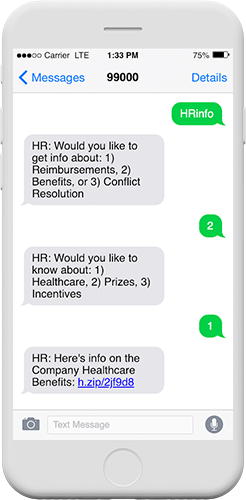
    1. 01 An HR department sets up the keyword "HRinfo" for employees to text for more information.
    2. 02 When texted, the employee is automatically sent a message asking if they want information about 1) Reimbursements, 2) Benefits, or 3) Conflict Resolution.
    3. 03 If the employee responds "2", they would then be asked if they want to know about 1) Healthcare, 2) Prizes, or 3) Incentives
    4. 04 If the employee responds "1", they could be sent healthcare information.
    5. 05 Better yet, if the company has collected information about the employee in our system such as their position, age, and chosen healthcare plan, they could be sent an even more specific link based on this data, automatically.

    Levels of Automation

    There are levels of automation, some more advanced than others. Basic automated workflows like auto-responders can be run by the most basic text messaging software, and drip campaigns can carry out simple campaigns that can nurture leads or send reminders at various intervals. True automation and advanced campaigns can only be carried out by software like Trum·pia because they require a level of sophistication that simple texting software can not match.
  • Basic

    In its most basic form, responses can be automated whenever a subscriber takes an action. A common example of this is sending a message when someone texts your keyword. While this is what most companies consider automation, this is only the beginning for Trum·pia.

  • Drip

    This next level enables you to incrementally send messages to a subscriber at specific periods of time such as a day, week, and month after they text in your keyword. While these time intervals can be preset, most software cannot dynamically adjust their workflow based on the subscriber's actions or responses. While time is just a single variable in drip campaigns, it is only one of dozens for Trum·pia's automated workflows.

  • Advanced

    What sets Trum·pia's automation apart is our ability to branch down diverging paths based on how the contact responds and whether or not they took an action (e.g.: clicked a link or filled out a form). We can even personalize the flow of the conversation based on the data you've already collected. This makes each campaign tailored and engaging to the subscriber.


  • Frequently Asked Questions

    Can automated workflows send messages at specific times of day or only instantly after a trigger?

    You can schedule workflow messages to go out at any time or circumstance you want. Depending on your campaign, you may opt for sending messages optimal times instead of immediately after a trigger fires. This means someone who texts your keyword at 2 am can get their response at 9 am when they’re more likely to engage. Similarly, you can ensure promotional messages are only sent during business hours.

    SMS automation focuses specifically on text message campaigns and two-way conversations through workflows. By contrast, marketing automation platforms handle email, landing pages, and CRM tasks but often lack sophisticated texting features. Trum∙pia bridges this gap via advanced SMS workflows that can integrate with your existing marketing tools.

    Workflows automatically stop messaging any contact who opts out by texting STOP (or your specific opt-out keyword. Our system also maintains compliance records for you. Another useful tool lets you set frequency caps within workflows to prevent over-messaging, and our platform tracks consent so you never accidentally text someone who has unsubscribed.

    Yes, workflows can tag contacts and move them between lists based on their behavior. Common use cases include segmenting contacts by how they answer questions or the actions they take throughout the conversation. The result is dynamic segments that update automatically as people engage. So your targeting gets smarter the longer the workflow runs, all without any manual effort.
    Trum∙pia’s workflows can be used in a variety of ways. For example, workflows handle appointment scheduling by sending confirmations, reminders, and follow-ups based on calendar dates you set. You can go further by building flows that: Ask for appointment preferences Send reminders 24 hours before Request feedback after the visit Or even handle rescheduling requests through two-way conversations

    Ask Us A Question

    Or Call Us at 1-888-707-3030

    To see a live demo immediately:

    M-F 8AM-5PM Pacific Time

    OR

    Absolutely Nothing Hidden

    • Trum·pia
    • Competition
    Plan Pricing Low Price High + Hidden Fees
    Carrier Fees Completely Free Read Fine Print
    No Extra Credits To Buy Thousands Included Can Be Misleading
    Phone Support Mostly Free Check Before Buying
    Multiple Keywords Mostly Free Know Before You Buy
    Toll-Free Number Completely Free Check Before Buying
    Inbound Messages Completely Free Check Before Buying
    Unlimited Contacts Free for SMS Check Before Buying
    Telecom Charges Completely Free Read Fine Print
    Onboarding 1-on-1 Training Check Before Buying
    Number Provisioning Self or Assisted Check Before Buying
    *Mouse over for details
    *Tap for details
    • Trum·pia
    Plan Pricing Low Price
    Carrier Fees Completely Free
    No Extra Credits To Buy Thousands Included
    Phone Support Mostly Free
    Multiple Keywords Mostly Free
    Toll-Free Number Completely Free
    Inbound Messages Completely Free
    Unlimited Contacts Free for SMS
    Telecom Charges Completely Free
    Onboarding 1-on-1 Training
    Number Provisioning Self or Assisted
    • Competition
    Plan Pricing High + Hidden Fees
    Carrier Fees Read Fine Print
    No Extra Credits To Buy Can Be Misleading
    Phone Support Check Before Buying
    Multiple Keywords Know Before You Buy
    Toll-Free Number Check Before Buying
    Inbound Messages Check Before Buying
    Unlimited Contacts Check Before Buying
    Telecom Charges Read Fine Print
    Onboarding Check Before Buying
    Number Provisioning Check Before Buying

    To see a live demo immediately:

    Call 1-888-707-3030 (Ext. 6000)

    M-F 8AM-5PM Pacific Time

    OR

    PARTNER APPLICATION FORM