
Set-up Google Analytics

Reseller Resources
Set-up Google Analytics

Deploying Google Analytics
Google Analytics is a great tool that provides web site usage tracking. Please follow the steps below to deploy Google Analytics for your WLW platform.

Getting Started

  1. 01Sign up for a Google Analytics Account

    First and foremost, you must sign up for a free Google Analytics Account.

  2. 02Find your UA ID

    Once you sign in, any current profiles you may have set up will be visible on your home page. Your UA ID can also be found here.
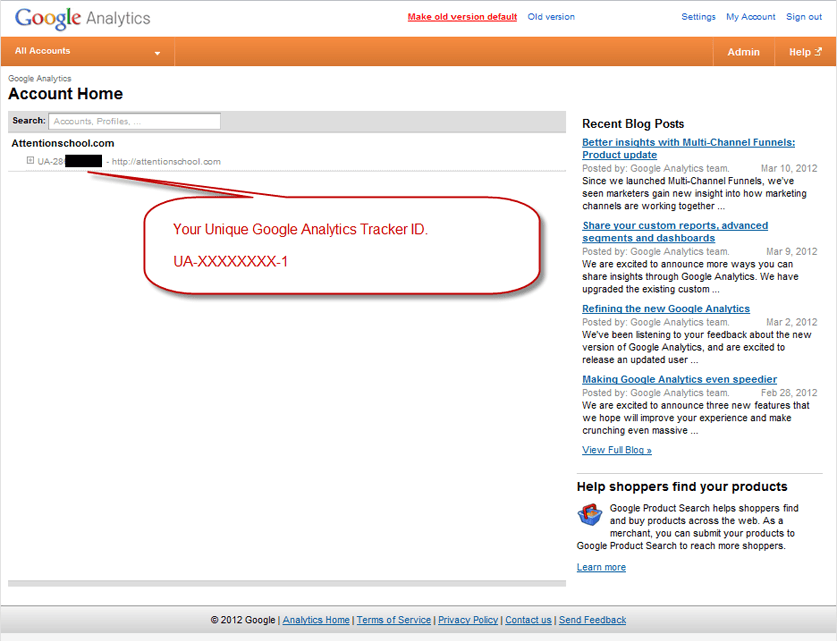
Implementing Google AnalyticsTrack Pages AFTER Login

  1. 03Configuring Account & System Settings

    Now that you've got your UA ID and Google Analytics account set up, you need to configure your reseller account setting to be able to apply the tool to your website pages.

    Reference the following example and adjust it to reflect your unique ID.

    IMPORTANT: *Be sure to preserve the single quotations ( ' ' ) at the beginning and end of your Unique ID. Otherwise, the code will not register properly.

    Example: gaq.push(['_setAccount', 'UA-88870730-1']);

        
    <"<"script type="text/javascript">
     var _gaq = _gaq || [];
    _gaq.push(['_setAccount', 'UA-UNIQUE ID']); 
    _gaq.push(['_trackPageview']);
    (function() {
    var ga = document.createElement('script'); ga.type = 'text/javascript'; ga.async = true;
    ga.src = ('https:' == document.location.protocol ? 'https://ssl' : 'http://www') + '.google-analytics.com/ga.js';
    var s = document.getElementsByTagName('script')[0]; s.parentNode.insertBefore(ga, s);
    )();
    	  

    Code Placement: From your WLW Control Panel, go to 'Account & System Settings' and scroll down to 'Google Analytics.' You'll need to paste in 2 of the 3 fields.
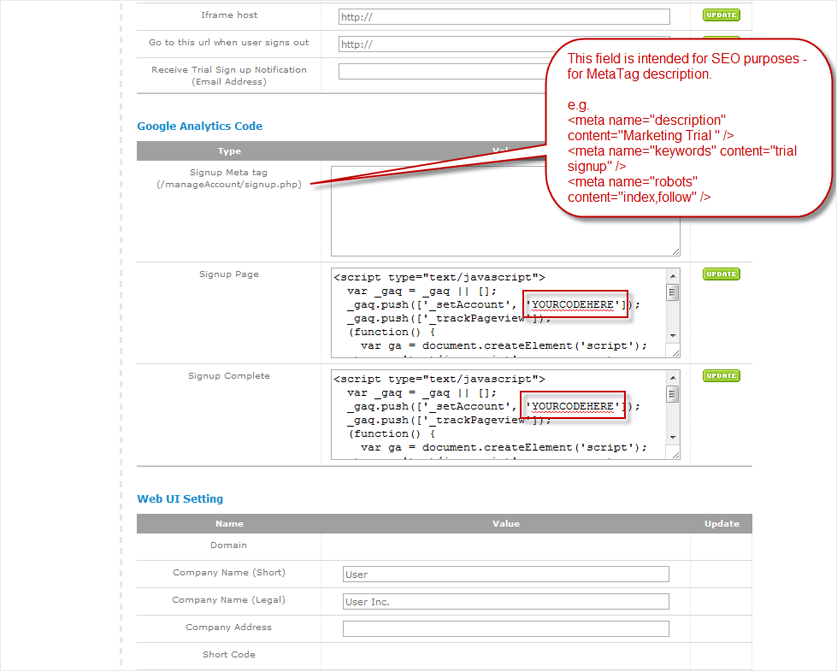
    An example of where meta tags go in our user interface

  2. Track Pages BEFORE Login 04Landing Page & Website Tracking

    Instructions from Google on how to deploy for your Website

    • Here are the instructions for implementing Google Analytics on your website.
    • For more information, click here.
    • Copy the following code and paste it onto every page you want to track immediately before the closing tag.
    • Remember to modify the UNIQUE ID with your own, otherwise it will not track properly.

    For those who are using the WLW Reseller Template, you'll need to tag the following pages.

    -index.html

    -Header.html

    These pages can be found under 'Account & System Settings' → 'File Management'
    Code Sample:

      <<"script type="text/javascript">
     var _gaq = _gaq || [];
    _gaq.push(['_setAccount', 'UA-UNIQUE ID']); 
    _gaq.push(['_trackPageview']);
    (function() {
    var ga = document.createElement('script'); ga.type = 'text/javascript'; ga.async = true;
    ga.src = ('https:' == document.location.protocol ? 'https://ssl' : 'http://www') + '.google-analytics.com/ga.js';
    var s = document.getElementsByTagName('script')[0]; s.parentNode.insertBefore(ga, s);
    )();</script>  

Final Check:

  1. To verify that your Google Analytics Code is properly installed, log into your Google Analytics account and check to see if there is activity reported from all the pages you have tagged. If you aren't seeing a particular page, you may need to verify that the tracking code is installed properly.

    Please Note: Google Analytics does take 24-48 hours before data is reported on the UI from initial page tagging.

Ask Us A Question

Or Call Us at 1-888-707-3030

6AM – 6PM Pacific (Weekdays)

8AM – 12PM Pacific (Weekends and Holidays)

To see a live demo immediately:

M-F 8AM-5PM Pacific Time

OR

Absolutely Nothing Hidden

  • Trum·pia
  • Competition
Plan Pricing Low Price High + Hidden Fees
Carrier Fees Completely Free Read Fine Print
No Extra Credits To Buy Thousands Included Can Be Misleading
Phone Support Mostly Free Check Before Buying
Multiple Keywords Mostly Free Know Before You Buy
Toll-Free Number Completely Free Check Before Buying
Inbound Messages Completely Free Check Before Buying
Unlimited Contacts Free for SMS Check Before Buying
Telecom Charges Completely Free Read Fine Print
Onboarding 1-on-1 Training Check Before Buying
Number Provisioning Self or Assisted Check Before Buying
*Mouse over for details
*Tap for details
  • Trum·pia
Plan Pricing Low Price
Carrier Fees Completely Free
No Extra Credits To Buy Thousands Included
Phone Support Mostly Free
Multiple Keywords Mostly Free
Toll-Free Number Completely Free
Inbound Messages Completely Free
Unlimited Contacts Free for SMS
Telecom Charges Completely Free
Onboarding 1-on-1 Training
Number Provisioning Self or Assisted
  • Competition
Plan Pricing High + Hidden Fees
Carrier Fees Read Fine Print
No Extra Credits To Buy Can Be Misleading
Phone Support Check Before Buying
Multiple Keywords Know Before You Buy
Toll-Free Number Check Before Buying
Inbound Messages Check Before Buying
Unlimited Contacts Check Before Buying
Telecom Charges Read Fine Print
Onboarding Check Before Buying
Number Provisioning Check Before Buying

To see a live demo immediately:

Call 1-888-707-3030 (Ext. 6000)

M-F 8AM-5PM Pacific Time

OR

PARTNER APPLICATION FORM