













• Resources
  • Resource Center

How SMS Marketing Works

  • What is SMS Marketing?

    SMS Marketing is an advertising channel that allows businesses to advertise, promote, and engage with their audience through text messaging. The benefits that text message marketing has over traditional forms of marketing are: texts are a personal way of communication, SMS messages have a 98% open rate, and since American consumers never leave home without their cell phones, your text message will be seen within minutes after sending them out.

    Trum·pia’s step-by-step guide walks you through how Trum·pia’s marketing platform works, allowing you to see how incredibly useful our SMS marketing software can be for your business, enabling you to reach your customers, engage with them, promote your business and automate your marketing.

    How It Works

    Mobile Keywords are easy to create and unique to your business or organization. Customers who text in your mobile keyword using your short code will be opted-in to receive messages and promotions from your business.
    Easily Setup your Mobile Keyword in Trum·pia’s Marketing Software
    • Step 1  Select “Keyword Signup” from the drop down list and click the “Create” button next to it.

    • Step 2 Type in your desired Mobile Keyword and instantly see if the keyword is available for use! Your customers will text your unique mobile keyword to your assigned short code.

    Step 3  Create an Auto Response to welcome your customers and inform them about any promos, deals, specials, coupons, or offers your business will have in the future.

    Trum·pia’s Auto Response allows you to:

    • Send an automatic reply to everyone that Opts-in using your mobile keyword.
    • Create a trackable URL to determine how many unique clicks went to your link.
    • Add a Coupon Code to redeem at your business.
    Additional Features of Trum·pia’s SMS Service:

    • Set the number of replies to prevent multiple opt-ins from the same number
    • Capture additional information, such as name, email, date of birth and remarket to them with Marketing Automation
    • Send an alternative auto-response
    • Send notifications to your phone or email address whenever someone opts in using your mobile keyword

    The next step is to let customers know how they can join your text marketing program, which you can do in a number of ways. Include it in flyers or at the end of your receipts. Display it around your shop or on your counter so customers can see the promotion and know how to opt-in using your mobile keyword and short code. Other ways of promoting include: posting on social media or local print ads.

  • Hard Rock Café using Trum·pia to offer exclusive deals and promotions only through texts.

  • eBay used Trum·pia to help promote their app release, which has received over 100 million downloads.

  • Taco Bell used Trum·pia to conduct text message surveys on customer receipts to help measure and improve their customer satisfaction.

  • Boost your engagement through Social Media like Rapper T.I. did when he used Trum·pia to promote his movie debut of "Takers" by having fans text his mobile keyword for a chance to win a private screening.

  • More Ways to Promote Your Business With Mobile Keywords:
    Other options you can also use for promoting your mobile keyword include: incentivizing customers by offering a coupon, which you can send automatically to your customers that opt-in. The more phone numbers you collect and add to your distribution list, the more effective your marketing campaigns will be.

  • With Trum·pia, your business can build a mobile loyalty program much like Wendy's does with their SMS Marketing Campaigns.

  • The Lakers incentivized fans with game tickets as part of their marketing promotions, using LAKERS as their mobile keyword for a text-to-win campaign.

  • Being organized is always a vital part of productivity, and sorting your customers into distinct groups is one way to achieve this. By doing this in advance, it will save you time and energy of having to manually input one contact at a time. Once you have your group, you can send more specific messages that apply to just them.

    With Trum·pia’s Contact lists, you can segment your contacts within distribution groups which allow you to target them with the right marketing campaign, whether it’s text messaging, emailing, or social media.

    Build a comprehensive list to target the different types of customers you may have. Keeping your contacts segmented into different groups allow you to easily send the right message at the right time, with a single click.

    Easily Import or Add Contacts

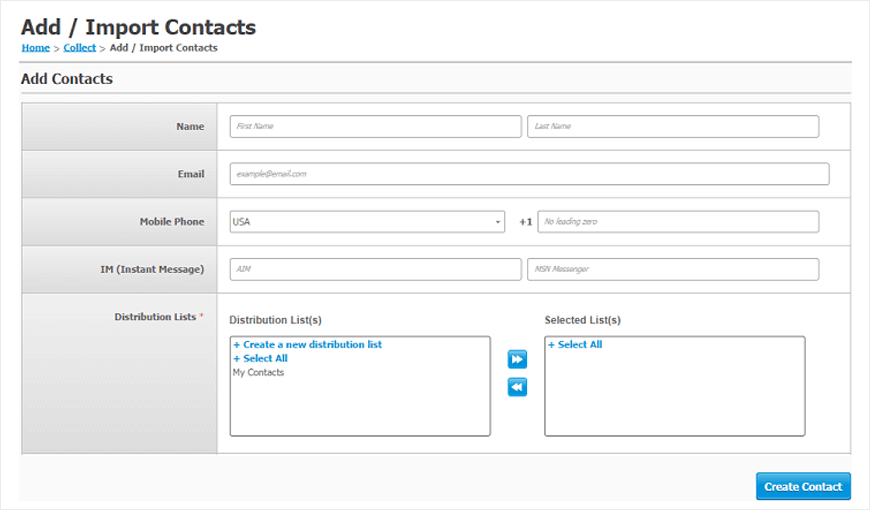
    With Trum·pia, you can easily add/import contacts you already have into your distribution list.First click on the Collect Contacts button. Alternatively, click on the Collect drop down menu, select Add/Import Contacts.

    Adding Contacts is easy within Trum·pia's Marketing Platform
    Once you’ve reached the Add/Import Contacts page, the next step is to add your contacts to Trum·pia. Complete as much information you have on your contacts, leaving the others blank so you can send out future SMS Marketing campaigns to capture more details about them.

    Quickly Import Contacts to your Distribution Lists
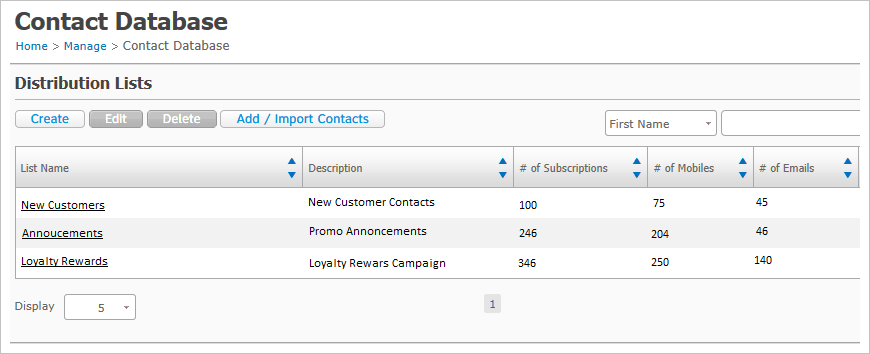
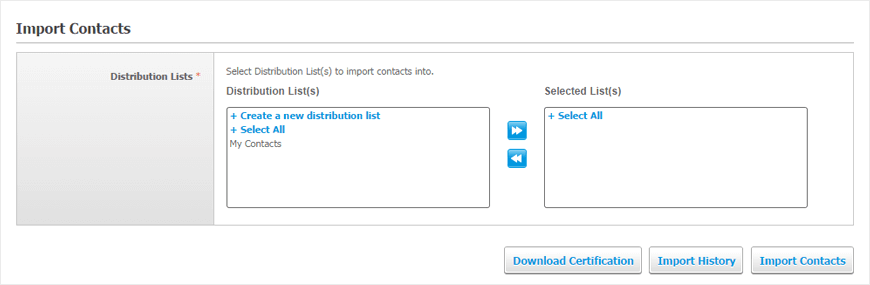
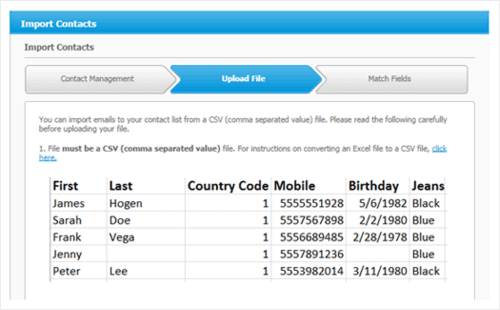
    Trum·pia’s Import Contacts feature allows you to easily upload your pre-existing contacts into Trum·pia’s software. Within 3 steps, you can upload your database to whichever distribution lists you’d like, helping you stay organized when it comes to your most important asset, your customers.

    You can create custom contact fields that allow you to put in any custom data fields you’d like to capture about your customer, such as: date of birth, birthdays, anniversaries, and anything else you’d like to know about your customers. This is a great way of segmenting and marketing to particular groups of interests. For example you can segment your customers who prefer blue or black jeans within Trum·pia’s custom data fields. With your SMS marketing campaigns, you can text promos, specials, or discounts to customers that fall into blue jeans one week and black jeans the following week, automatically.

    Once you have collected your contacts and uploaded them into your distribution list, the most important thing to do is to send your text messages to your customers.

    Start by clicking the Send Messages button within Trum·pia’s interface, or alternatively click Send Messages from the Message dropdown menu to start creating your first SMS Campaign.

  • With Trum·pia, your business can build a mobile loyalty program much like Wendy's does with their SMS Marketing Campaigns.

  • The Lakers incentivized fans with game tickets as part of their marketing promotions, using LAKERS as their mobile keyword for a text-to-win campaign.

  • Trum·pia allows you to easily send your text messages within our online marketing platform. Our interface allows you to automate your campaigns and remarket your customers based on their preferences using SMS marketing automation.

  • Step 1 The first thing to do is fill in your message description to identify the text message you are about to send. You can track the progress of this text within Trum·pia's reporting feature, or this composed message in future marketing campaigns.

  • Step 2The Send Via function allows you to choose which marketing channels you'd like to send your message through. Click the Text Message (SMS & MMS) checkbox in order to send out text messages to your customers.

  • Step 3Pick how often you'd like your text to be sent: One time messages to your distribution lists or individuals to automatically sending messages to customers who recently opted into your mobile keyword.You can also create recurring messages to your distribution lists, making it perfect for recurring reminders or promotions.

  • Step 4Assign which report you would like this particular text message to show up under. Ideally, if you are running a SMS Campaign, you would want all your text messages related to that campaign to be assigned to the same report. The Report Manager section is where you assign that.

  • Step 5Choose what time you'd like to send your message, whether it's immediately(Send Now) or if you'd like to schedule your message to a later date and time.

    Then create your message by clicking on Compose Message.

    Composing your text message is easy to do and Trum·pia offers many advanced features that take your marketing campaigns to the next level. With Trum·pia's SMS software, you can broadcast text messages and picture messages or videos to your customers, giving them visuals that would help entice a purchase. You can even utilize a coupon code in your texts which can be redeemed at your business.
    Start by clicking the Send Messages button within Trum·pia's interface, or alternatively click Send Messages from the Message dropdown menu to start creating your first SMS Campaign.
  • Add your Company Name

    Type your company name into the header to inform your customers that the text messages are coming from your business.
    Click the symbol to insert the header (Your Business Name) into the body of your text message.

  • Compose your Message

    Here is where you will type in your text to your customers. Ideally, you will want to promote any specials, sales, upcoming events, coupon codes, or links to your website or your online form to capture more information about your customers to re-market to them later.
    Keep in mind you have a 160 character limit, so be creative and straight to the point!

  • Selecting your Recipients


    Once you finish composing your text, you will need to choose which distribution list you would like to send your message to.


    Highlight your desired Contact List and click the right arrow to include the list into your Selected area (recipients that will receive the text message).


    Once you have clicked the right arrow button to include your highlighted Contact List, it will show up within the Selected section.


    After you have selected the recipients of your text message, click the Preview & Send button.

    Sending your Text Message


    Preview your message before sending it out. Check to make sure your delivery time, and that selected distribution lists are correct.


    Review the Delivery and Cost Summary of the total amount of text credits it will be required to send.


    Preview what your text message will look like before sending out your message.


    Once you are satisfied with your message, click on the Agree to Terms checkbox and click send.

    By now you know how powerful Trum·pia's text messaging software is. In addition to sending out texts immediately or scheduling text messages, find out what advanced text messaging features Trum·pia can do for your marketing efforts and increase the ROI of your business.
    Start by clicking the Send Messages button within Trum·pia's interface, or alternatively click Send Messages from the Message dropdown menu to start creating your first SMS Campaign.
  • Personalize with Mail Merge

    Be even more personal with your customers that opted in by addressing your texts using their First or Last Name.
    *You must have the First or Last Names of recipients in order for Mail Merge to work effectively.

  • Add a Mobile Coupon Code

    Add a Coupon Code to your text message that incentivizes your customers.
    *You must first have a coupon created to be able to insert into a text message.

  • Add a Picture or Video in your Text Message

    Easily add a picture or video to your text message and send to your customers. It's a great way of showing a visual representation of what you're offering or send a flyer of an upcoming event.
    *MMS messages use a different short code and will cost an additional fee.

  • Ask Us A Question

    Or Call Us at 1-888-707-3030

    6AM – 6PM Pacific (Weekdays)

    8AM – 12PM Pacific (Weekends and Holidays)

    To see a live demo immediately:

    M-F 8AM-5PM Pacific Time

    OR

    Absolutely Nothing Hidden

    • Trum·pia
    • Competition
    Plan Pricing Low Price High + Hidden Fees
    Carrier Fees Completely Free Read Fine Print
    No Extra Credits To Buy Thousands Included Can Be Misleading
    Phone Support Mostly Free Check Before Buying
    Multiple Keywords Mostly Free Know Before You Buy
    Toll-Free Number Completely Free Check Before Buying
    Inbound Messages Completely Free Check Before Buying
    Unlimited Contacts Free for SMS Check Before Buying
    Telecom Charges Completely Free Read Fine Print
    Onboarding 1-on-1 Training Check Before Buying
    Number Provisioning Self or Assisted Check Before Buying
    *Mouse over for details
    *Tap for details
    • Trum·pia
    Plan Pricing Low Price
    Carrier Fees Completely Free
    No Extra Credits To Buy Thousands Included
    Phone Support Mostly Free
    Multiple Keywords Mostly Free
    Toll-Free Number Completely Free
    Inbound Messages Completely Free
    Unlimited Contacts Free for SMS
    Telecom Charges Completely Free
    Onboarding 1-on-1 Training
    Number Provisioning Self or Assisted
    • Competition
    Plan Pricing High + Hidden Fees
    Carrier Fees Read Fine Print
    No Extra Credits To Buy Can Be Misleading
    Phone Support Check Before Buying
    Multiple Keywords Know Before You Buy
    Toll-Free Number Check Before Buying
    Inbound Messages Check Before Buying
    Unlimited Contacts Check Before Buying
    Telecom Charges Read Fine Print
    Onboarding Check Before Buying
    Number Provisioning Check Before Buying

    To see a live demo immediately:

    Call 1-888-707-3030 (Ext. 6000)

    M-F 8AM-5PM Pacific Time

    OR

    PARTNER APPLICATION FORM