
- Pricing
- Trum·pia Plans
Text Message Software Pricing
Compare With Competition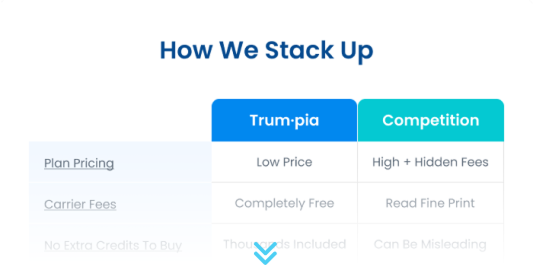
Lite Plan
Our Entry-level Plan$55 /month if paid annually
$69/mo if paid monthly.Lite Plan Includes:
Text and Email Messaging
Robust SMS Tools
Picture and Video Messaging
Consolidated 2-Way Inbox
Online Sign Up Forms
Data Capture
Contact Import
365-Day Online Support
2,000 SMS Messages
Free Inbound Messages
Unlimited SMS Contacts
20,000 Email Messages
2,000 Email Contacts
5 Keywords
Standard Plans
Fully-Featured with Phone Support- 3,000
- 5,000
- 7,500
- 10,000
- 15,000
- 20,000
- 25,000
- 30,000
- 35,000
- 40,000
- 50,000
- 60,000
- 70,000
- 80,000
- 90,000
- 100,000
- 100,000+
$69 /month if paid annually
$89/mo if paid monthly.Lite Plan Features Plus:
- Customizable Inbox Message Filters
- Dynamic Targeting
- Voting Campaigns
- Send From Phone
- Contact Cleanup Tools
- Integrations
- 1 on 1 Training
- Phone Support
- 3,000 SMS Messages
- Free Inbound Messages
- Unlimited SMS Contacts
- 30,000 Email Messages
- 3,000 Email Contacts
- Unlimited Keywords
Smart Plans
First Class Service + Account Manager- 3,000
- 5,000
- 7,500
- 10,000
- 15,000
- 20,000
- 25,000
- 30,000
- 35,000
- 40,000
- 50,000
- 60,000
- 70,000
- 80,000
- 90,000
- 100,000
- 100,000+
$87 /month if paid annually
$109/mo if paid monthly.Standard Plan Features Plus:
- Workbench: Automated Workflows
- Access Control
- Multiple Data Sets
- Dedicated Account Manager
- Campaign Consulting
- Compliance Training
- 9 Minute Response (Business Hours)
- 3,000 SMS Msgs (Rollover Credits)***
- Free Inbound Messages
- Unlimited SMS Contacts
- 30,000 Email Messages
- 3,000 Email Contacts
- Unlimited Keywords
- 15 Tiles per Workflow
- 1 Data Set
- Customer Success Manager
- Dedicated Account Manager
- Priority Support
- We will fully customize 3 workflows for
your business
** Our pricing starts very affordable, and we include everything in one price. Competitors often charge extra carrier fees
(mostly hidden), telecom charges (some hidden), high overage costs, and an added cost for phone support. Check it out here.
*** For Smart Plans, credits rollover for one extra month, which means they expire 60 days after purchase. Standard plan credits do not rollover and expire 30 days after purchase. Annual plan credits are given upfront and expire 1 year after purchase.
- Plan Comparison
- Lite Plan
- Standard Plan
- Smart Plan
| Features | |||
|---|---|---|---|
Contact Cleanup Easily clean up your database by removing landlines and other invalid numbers. | |||
Contact Limit (Email) Email contacts are limited to ensure speedy deliverability and compliance. | |||
Custom Data Fields We can take the information you learn from contacts and populate various fields in your messages. | |||
Dynamic Targets Dynamic Targets keep your filtered distribution lists organized in real time, automatically updating whenever a new subscriber is added. | |||
Easily send emails to your contacts either en masse or by contact list and other targeting data. | |||
Email Templates We have beautiful email templates available (as well as the ability to customize your own). | |||
Consolidated Inbox Our consolidated inbox allows you to see the entire history of messaging with your contacts in one place. | |||
Import Easily import groups of contacts into our system by uploading a list of opted-in contacts. | |||
Integrations We integrate with various third party applications so you can enable messaging based on various triggers. | |||
Keywords Keywords are the easiest way for users to opt in to your texting campaigns. | |||
Mass Messages Easily send out a mass text or email message to your contact lists. | |||
Multiple Datasets Data sets keep features, contacts, credits, and message history for various users or locations. | |||
Multiple Users Easily assign roles and access to different people or locations in your organization. | |||
OSP Online signup pages allow you to capture opt-ins and other information about your contacts. | |||
Reports Our powerful reports let you track things like open rates, opt ins, opt outs, and much more. | |||
Send from Phone Send from phone allows you to text your contact lists directly from your registered number. | |||
Site & Event Tracking Setup Our site and event tracking is a powerful way to add various triggers to your texting campaigns. | |||
SMS Templates We have various messaging templates you can use or customize to fit your specific needs. | |||
TFN Onboarding (Verification) Our team is on hand to help you with the application process for your permanent texting number. | |||
Voting SMS surveys allow you to gather more information and can be used to run voting campaigns. | |||
| Advanced Workflow Automation | |||
Workbench Trum·pia Workbench is an automated workflow builder that allows you to customize your text messaging and email campaigns through an easy-to-use UI with drag-and-drop functionality. | |||
Drag & Drop Customization Easily drag and drop to build powerful workflows that can carry out powerful messaging campaigns for you. | |||
50+ Prebuilt Workflows We have a library of over 50 pre-built workflows that you can quickly edit to meet your specific needs. | |||
Workflow Integration with 3rd parties Our workflows can integrate with third party solutions such as Salesforce to deliver even more powerful automation. | |||
Advanced Conditional Branching Branch contacts based on different conditions in order to send the most tailored messages. | |||
Ask Question Tile This powerful Workbench tile is capable of asking different type of questions, store their responses and branch them for even more powerful automation. | |||
Behavioral Tracking See what actions your subscribers take like if they click a link or reply to your messages. This helps you to target them better. | |||
| Basic Automation | |||
Auto Responder Send an automated message to your subscribers when they text your mobile keyword or fill out an online signup form. You can offer incentives, ask additional questions, and much more. | |||
Link Tracking Link Tracking allows you to track whether or not a contact has clicked a link. You can then save that data to their contact profile for future targeting or have further actions carried out automatically. | |||
Dynamic Targeting Dynamic Targets keep your filtered distribution lists organized, automatically updating whenever a new subscriber is added, a contact unsubscribes, or an existing profile gets updated. | |||
Appointment Reminders Automatically send messages at the right date and time with Appointment Reminders. You can even choose to have a message automatically sent to only your subscribers who meet certain criteria. | |||
Drip Campaigns Drip campaigns methodically and regularly sends messages at a specific interval whenever someone takes a certain action in Trum·pia’s system. | |||
Conditional Drip Campaigns These are advanced drip campaigns that can carry out different actions based on different triggers and conditions that are met, like sending a new customer an introductory text automatically. | |||
| Support | |||
365-Day Support Our live support team is on standby 365 days a year, including during holidays or on weekends. | |||
Group Onboarding & Webinars Our team of experts hold group training sessions to help onboard new users as well as recorded webinars for anyone to watch. | |||
24/7 Online Help Center Our online help center is available 24/7 to assist our users in learning our system or to troubleshoot minor issues. | |||
Online Support Submit a ticket in our UI or send an email and our customer service team will respond to you quickly, typically under 9 minutes during business hours. | |||
Phone Support Our premium plans have live phone support 7 days a week with experts who are ready to help you troubleshoot any issues or learn more about our system. | |||
9 Minute Support Response We have 365 day support (including holidays and weekends) and we typically respond within 9 minutes during business hours. | |||
1 on 1 Training We have onboarding specialists ready to walk you through our system and get everything set up quickly so you can start your messaging campaigns. | |||
Dedicated Account Manager Smart Trum·pia plans have a Dedicated Account Manager who will help you get the most out of your messaging campaigns and brainstorm how automation can help you do more. | |||
Campaign Consulting We don’t leave you to fend for yourself. We have a team dedicated to looking for solutions to your business objectives, so you get the most out of our software and create super effective campaigns. | |||
Compliance Training We have an onboarding team who are happy to answer any questions you have so you don’t run afoul of any regulations. | |||
Why Choose Trum·pia? Download Handout
Campaign Management
As an add-on service to any plan, hire our team of industry experts to create and run campaigns for you.
Talk to SalesIntegration Services
Hire our development team to create custom integrations for you including advanced reports, location finder, and more.
See Integration ServicesAdd-ons
If you need additional features or services on top of what already comes bundled in one of our plans, see our add-on pricing.
See Add-ons
Discover how Trum·pia's API delivers best-in-class support at no additional charge along with higher throughput and lower costs.
See API PlansFAQs
Why should I choose Trum·pia?
There’s a reason why Forbes picked us as the #1 SMS marketing software. Trum·pia comes with features and service you can’t find anywhere else, like drag-and-drop automated workflows, review management, lifelong customer journeys, omni-channel messaging, live phone support, and dedicated account management (with the proper plan)..
How are messaging credits used?
Credits are used for each text message sent or received. Longer messages may use more credits. One credit is 160 characters or less in length.
Can I attach videos, pictures, and GIFs to my text messages?
Yes, that is considered an MMS message. MMS messages typically cost 3 messaging credits compared to 1 messaging credit for a standard SMS message (160 characters).
Do credits roll over?
Lite & Standard Plans refresh credits every month, but Smart Plans include an additional 30-day rollover (for monthly options). All annual options provide the entire year’s worth of credits upfront with a 12-month rollover period.
How soon can we start sending messages once we pay?
The industry-mandated verification process usually takes between 2 and 10 days. Shortcodes take longer to provision, typically between 4 and 6 weeks. While you are waiting for your number to be approved you can ask for a temporary number so that you can test.
What happens if I run out of credits?
You can purchase credit buckets a la carte from your account or you can call us to purchase them as well. You can also upgrade your plan to get more credits.
What type of number will I be receiving with my account?
All Trum·pia accounts are given a toll-free number free of charge. 10DLCs (10-digit long codes) and dedicated short codes can also be provisioned for an additional fee(s).
Can I use my current number for texting?
Absolutely. We can text-enable existing landline numbers. It typically takes around 10 business days to get the number provisioned.
I'm a small business that wants to grow. Can Trum·pia help?
Absolutely. The same features and tools that help Fortune 500s have been used by our small business partners to great success. Connect with us today and we can discuss a plan to fit your needs.
What is a carrier message charge?
Carrier charges are small surcharges that mobile carriers apply to both incoming and outgoing messages. Incoming messages (also known as Mobile Originated, or MO’s) are messages subscribers send to companies or organizations. MT (Mobile Terminated, or MT’s) are messages sent by services to their subscribers.
Reseller Plans
Want to join the exciting SMS industry? Become a Trum·pia Reseller and sell our platform as your own.
Get 1-on-1 training, create custom plans, and keep 100% of the profits.
Ask Us A Question
Or Call Us at 1-888-707-3030