














- Product
- Automated Text Message Workflows
Text Message
Workflow
Use Text Message Workflows to Carry Out Tasks For You
Trum·pia offers powerful Automated Workflows that carry out your text messaging and email campaigns for you, without any programming required. You just build it and we take care of the rest, saving valuable time by carrying out tasks that would take too much time and manpower for you to do manually. Trum·pia's Automated Workflows can then carry out two-way conversations with subscribers that respond to them in real-time. We even have prebuilt templates that you can modify in seconds to meet your messaging needs.
How It Works
- 01
Set a condition that will trigger the Automated Workflow. For example, whenever a contact:
- Texts your keywords
- Clicks your links
- Responds to your message
- Accumulates 20 points in Lead Scoring
- Completes a survey, etc.
- 02
Set the corresponding action that will be set off when the condition is met. For example:
- Send an SMS or email message
- Ask a question
- Initiate a drip campaign
- Send a shortened link
- Add the contact to a distribution list
- Save data to the contact's profile
- Send an automated reminder
- 03
Set what happens next based on how the subscriber responds/behaves. For example:
- If they click the link vs if they don't
- How they answer the question
- Which of the multiple choice options they choose
- The contact data you already have in your database
- 04
The tasks can be set to wait minutes, hours, weeks, or days before being carried out.
Example
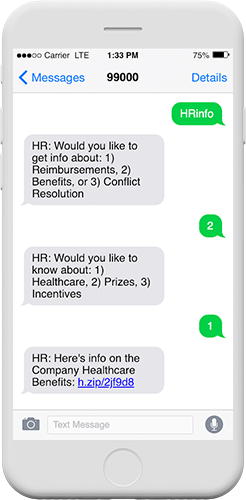
- 01 An HR department sets up the keyword "HRinfo" for employees to text for more information.
- 02 When texted, the employee is automatically sent a message asking if they want information about 1) Reimbursements, 2) Benefits, or 3) Conflict Resolution.
- 03 If the employee responds "2", they would then be asked if they want to know about 1) Healthcare, 2) Prizes, or 3) Incentives
- 04 If the employee responds "1", they could be sent healthcare information.
- 05 Better yet, if the company has collected information about the employee in our system such as their position, age, and chosen healthcare plan, they could be sent an even more specific link based on this data, automatically.
Levels of Automation
Basic
In its most basic form, responses can be automated whenever a subscriber takes an action. A common example of this is sending a message when someone texts your keyword. While this is what most companies consider automation, this is only the beginning for Trum·pia.
Drip
This next level enables you to incrementally send messages to a subscriber at specific periods of time such as a day, week, and month after they text in your keyword. While these time intervals can be preset, most software cannot dynamically adjust their workflow based on the subscriber's actions or responses. While time is just a single variable in drip campaigns, it is only one of dozens for Trum·pia's automated workflows.
Advanced
What sets Trum·pia's automation apart is our ability to branch down diverging paths based on how the contact responds and whether or not they took an action (e.g.: clicked a link or filled out a form). We can even personalize the flow of the conversation based on the data you've already collected. This makes each campaign tailored and engaging to the subscriber.

Use Cases of Automated Workflows
Ask Us A Question
Or Call Us at 1-888-707-3030